When operational problems occur during the revenue cycle, providers and billing teams usually explore ways to change/update the Taxonomy Code for NPI. In 2026, CMS data show that outdated or mismatched provider taxonomy remains one of the most common reasons for claim denial and credentialing delays, particularly in Medicare-linked and commercial payer systems. These problems usually happen during enrollment updates, specialty changes, or system revalidations in NPPES.
The taxonomy code is an essential data element in the NPPES system. CMS requires providers to maintain at least one current taxonomy connected to their NPI data, which payers use for claims classification and routing. CMS NPPES guidance, modified in 2026, allows providers to provide several taxonomy codes, but only one is designated as primary for claims processing and identification.
This blog explains the update process, related risks, and operational impact. It also highlights where providers and billing teams gain control over data accuracy, and where mistakes can disrupt billing workflows. Understanding both sides helps reduce errors and maintain consistency across NPI, payer systems, and billing platforms.
What is a Taxonomy Code in NPI Records and Why It Matters for Billing Accuracy
Taxonomy codes define the provider’s specialty within the NPI record system. In 2026, payer systems and clearinghouses continue to rely on this field for claim classification and routing. Errors in taxonomy data directly affect reimbursement flow and credentialing approval.
Role of taxonomy code in healthcare billing
Taxonomy code defines the provider’s service category during claim submission. It helps payers identify what type of care was delivered.
In 2026, claim scrubbing systems will increasingly validate taxonomy before first-pass acceptance. This reduces manual review when data matches payer rules.
Billing teams use taxonomy mapping to reduce denial risk and improve claim routing accuracy. It directly impacts reimbursement timelines and supports efficient medical billing services.
Role of Taxonomy Code in Provider Enrollment and Credentialing
Taxonomy also supports provider enrollment with insurance payers. It determines how a provider is classified within payer directories.
Incorrect classification can delay contract approval or trigger re-submission requests. This affects the start of billing privileges.
Credentialing teams rely on correct taxonomy alignment during payer enrollment. It ensures provider data consistency across systems.
Where taxonomy codes appear in healthcare systems
Taxonomy codes exist in NPPES records, billing platforms, and payer enrollment systems. These systems exchange provider identity data during claim processing.
In 2026, interoperability rules require consistent provider identifiers across multiple platforms. Mismatched data creates rejection points.
Healthcare IT teams monitor taxonomy alignment between EHR and billing systems. This reduces claim disruption and data conflicts.
Impact of incorrect taxonomy codes
Incorrect taxonomy codes lead to claim denials and payment delays. Payers may reject claims if the provider classification does not match the services billed.
Billing departments often face rework when taxonomy errors are detected after submission. This increases administrative workload and may require denial management services to recover lost revenue.
Credentialing inconsistencies also occur when taxonomy data differs across systems. This affects payer acceptance and network participation.
How to change/update Taxonomy Code for NPI in NPPES Step-by-Step Process
Updating taxonomy in NPPES is a controlled process that requires correct login access, provider verification, and accurate selection of classification data. In 2026, CMS validation checks are stricter, and incomplete updates often fail during submission or downstream payer verification.
Every correct update reduces the claim rejection while also promoting clean provider identification. An improper or partial update might cause credentialing delays, billing cycle delays, and payer revalidation requests.
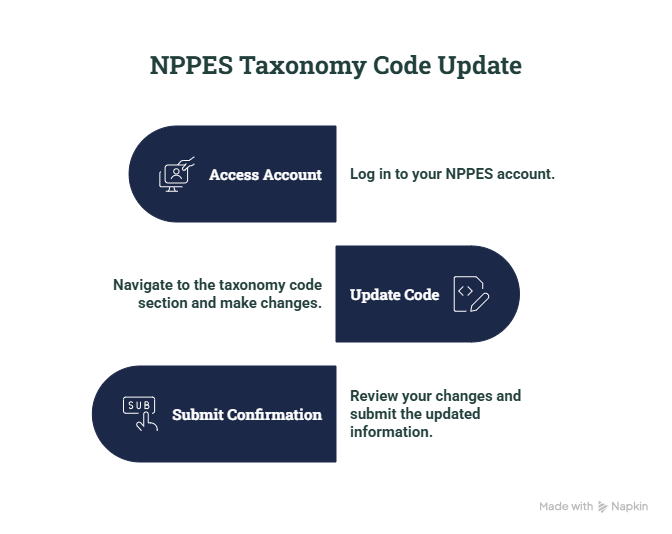
Accessing the NPPES account
Providers must check out the official NPPES portal with the username and password associated with their NPI record. Access issues are most commonly caused by expired credentials or incomplete account recovery.
Once logged in, users must select the correct NPI number from their dashboard. Each record must be reviewed carefully before editing begins.
Security verification is required before making any updates. This step ensures only authorized users modify provider data.
Updating taxonomy code field
Inside the NPI record, users must open the taxonomy section. This area contains primary and secondary classification fields.
Providers can add a new taxonomy or replace an existing one based on updated specialty status. Selection must match current clinical practice and payer classification rules.
Changes must be reviewed before saving. Improper selection may lead to claim rejection or credential mismatch.
Submission and confirmation
After updating taxonomy data, users must submit the revised NPI record for processing. The system records all changes in the NPPES database.
Confirmation status should be checked after submission. Updates may take time before appearing in the public NPI registry data.
Final verification should include cross-checking with billing systems and payer enrollment records. This ensures consistency across all healthcare data platforms.
How Users Can Update Their Taxonomy Code on NPPES Without Errors
Updating taxonomy code in NPPES requires accuracy in provider data entry and consistency across all healthcare records. In 2026, many update failures occur due to mismatched provider details or incorrect taxonomy selection during submission. These errors often result in delays in credentialing and claim processing.
A correct update process reduces claim rejections and prevents duplicate correction cycles. Errors in this step can affect enrollment status, payment timelines, and provider classification across insurance systems.
Common reasons for update rejection
Update requests are often rejected when provider information does not match existing NPPES records. Even small mismatches in name, license, or practice details can trigger system validation failure.
Selecting an incorrect taxonomy code is another frequent issue. If the selected code does not match the provider’s actual specialty, payers may flag the record during verification.
An incomplete submission is also a major cause of rejection. Missing required fields or failing to confirm changes prevents successful record updates.
Validation steps before submission
Before submitting updates, providers must verify all core identity fields. This includes NPI number, license data, and practice address consistency.
Taxonomy selection should align with current clinical services and payer classification standards. Billing teams often cross-check this with payer enrollment requirements.
A final internal review reduces submission errors. Credentialing teams typically validate updates before final approval to avoid rejection cycles.
Post-update verification
After submission, users must confirm that changes are reflected in the NPPES registry. System updates may take time to appear publicly.
Billing systems should be reviewed to ensure taxonomy sync is complete. Any mismatch can affect claim routing and acceptance.
Payer records must also be checked for alignment. This step prevents claim delays caused by outdated provider classification data.
Common Errors in NPI Taxonomy Code Updates and How to Avoid Them
Errors during taxonomy code updates in NPPES often lead to claim denials, credentialing delays, and mismatched provider records across payer systems. In 2026, a significant portion of provider data issues reported in billing workflows still trace back to incorrect taxonomy selection or incomplete record updates. These issues affect both individual providers and group practices.
Preventing these errors improves claim acceptance rates and reduces administrative rework. It also supports consistent provider identification across NPPES, EHR systems, and payer enrollment databases.
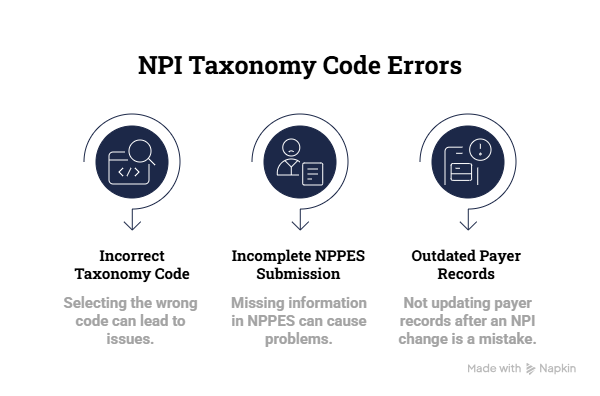
Selecting an incorrect taxonomy code
Providers often choose a taxonomy code that does not match their actual clinical specialty. This mismatch leads to payer rejection during claim validation.
In 2026, payer systems will use automated checks to compare billed services with taxonomy classification. Any mismatch can trigger denial or manual review.
To avoid this, providers should align taxonomy selection with current practice scope and payer-approved specialty definitions.
Incomplete NPPES submission
Many updates fail because required fields are left blank during submission. This includes missing confirmation steps or incomplete profile sections.
The NPPES system does not process partial updates. Any missing data blocks final approval of taxonomy changes.
A thorough inspection of all essential areas before submission decreases the chance of denial and eliminates the need for repeated correction cycles.
Not updating payer records after NPI change
Even after successful NPPES updates, some providers fail to update payer databases. This creates mismatches between billing and enrollment records.
In 2026, payers increasingly validate taxonomy data against their internal enrollment files before claim approval. Outdated records lead to rejection.
Coordinated updates across NPPES, billing systems, and payer portals are required to maintain consistency and prevent payment delays.
Conclusion
Accurate management of taxonomy codes in NPI records is essential for maintaining clean billing workflows and avoiding preventable claim denials. In 2026, payer systems will rely heavily on consistent taxonomy data across NPPES, enrollment files, and billing platforms for validation and reimbursement decisions.
A structured update process, combined with proper verification at each stage, reduces errors and supports stable revenue cycle performance. Consistency between provider records and payer systems remains critical for uninterrupted credentialing, claim acceptance, and payment processing.
FAQs
What is the purpose of a taxonomy code in NPI records?
A taxonomy code defines a provider’s specialty within the NPI system. Providers can apply it to classify claims, route them, and make reimbursement choices. Incorrect taxonomy data could lead to claim denials and enrollment complications.
How to change/update Taxonomy Code for NPI in NPPES?
Log in to the NPPES portal, select the relevant NPI record, and open the taxonomy section. Update or add the correct taxonomy code, then save and submit the changes. Always verify updates after submission.
How long does it take for taxonomy code changes to reflect in NPPES?
Most updates appear in the NPPES public registry after system processing. In some cases, it may take a few business days for changes to reflect across connected systems.
Can a provider have more than one taxonomy code in NPI?
Yes. Providers can list multiple taxonomy codes in their NPI record. However, only one code is marked as the primary taxonomy for claims processing and identification.
What are the common mistakes when updating taxonomy codes?
Common errors include selecting the wrong taxonomy code, submitting incomplete information, and not updating payer records after changes. These issues often result in claim delays or credentialing mismatches.