Are underpaid insurance claims silently reducing your practice revenue inside eClinicalWorks? In 2026, medical companies continue to report significant financial losses due to incorrectly paid claims at below-contract rates. Industry estimates show that nearly $48 billion is lost annually in the U.S. due to denied and underpaid claims combined, making underpayments a persistent financial issue rather than an isolated billing error.
When users search for “How to Audit eClinicalWorkers for Underpaid Insurance Claims,” the main issue is not claim rejection but hidden reimbursement gaps. According to recent revenue cycle data for 2026, around 62% of healthcare organizations identify underpayment detection as a major billing challenge, particularly when payer contracts and reimbursement criteria change more often. These issues are often ignored when practices depend only on regular payment posting operations without systematic audit checks.
This blog explains how to find, review, and validate underpaid claims inside eClinicalWorks using a step-by-step audit process. It also identifies critical risks such as revenue leakage, incorrect accounts receivable reporting, and delayed recovery cycles.
What is an Underpaid Insurance Claim in eClinicalWorks?
An underpaid insurance claim in eClinicalWorks occurs when the payer reimburses less than the contracted allowed amount for a billed service. This does not involve denial. The claim is processed, but the payment is lower than expected. This issue directly affects revenue accuracy in the billing cycle.
For users searching for ” How to Audit eClinicalWorkers for underpaid insurance claims, this section explains the base concept required before starting any audit process. Underpayments often remain unnoticed because claims appear “paid,” even when reimbursement is incorrect. Without a structured comparison between expected and actual payments, revenue loss continues over time.
In eClinicalWorks workflows, underpayments are usually linked to contract mismatch, payer processing rules, or internal posting errors. These issues affect billing accuracy, AR reporting, and financial forecasting.
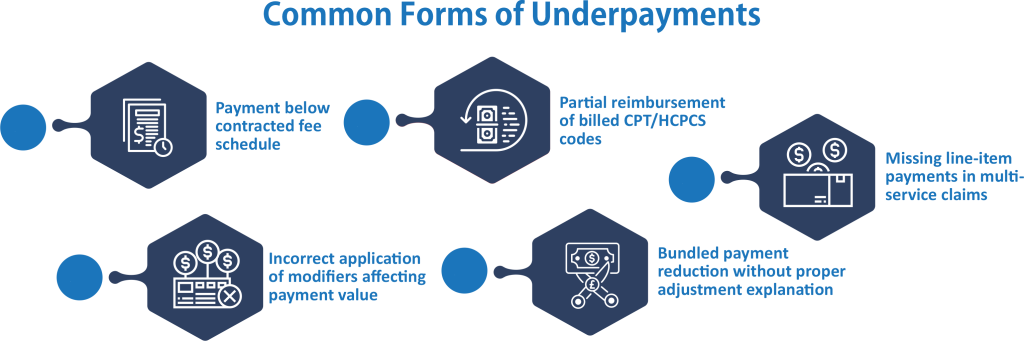
Common Forms of Underpayments
Underpayments in eClinicalWorks occur across multiple billing scenarios. These patterns repeat across payers and specialties.
Payment below contracted fee schedule: Occurs when the payer reimburses less than the agreed contract rate for a CPT/HCPCS code.
Partial reimbursement of billed CPT/HCPCS codes: Happens when only part of a billed service is paid without clear justification.
Incorrect application of modifiers affecting payment value: Arises when modifiers are ignored or misapplied, leading to reduced payment.
Bundled payment reduction without proper adjustment explanation: Occurs when services are bundled and paid at a lower combined rate without transparency.
Missing line-item payments in multi-service claims: Happens when one or more billed services in a single claim are not reimbursed.
Impact of Underpayments on Revenue Cycle
Underpayments directly affect financial performance in healthcare organizations using eClinicalWorks. The impact increases when audits are not performed regularly.
- Reduced net reimbursement per encounter
- Distorted accounts receivable reporting
- Delayed revenue recovery cycles
- Increased workload on the billing and AR teams
- Inaccurate payer performance tracking
Why Underpayments Occur in eClinicalWorks Systems
Underpayments in eClinicalWorks happen due to mismatches between payer rules, contract terms, and internal billing workflows. These issues do not always trigger claim rejections. Instead, claims are paid at lower amounts than expected. This creates hidden revenue loss that builds over time.
Billing teams cannot implement consistent rectification measures if they do not identify the root cause of underpayments. Most problems stem from payer’s contract gaps and internal posting errors.
In many cases, underpayments are not detected during routine claim posting. They are only found when payment reconciliation is done against contract fee schedules.
Payer Contract and Fee Schedule Mismatch
Payer contract and fee schedule mismatch is a primary cause of underpayments in eClinicalWorks. This happens when system fee schedules do not match current payer agreements.
Common causes include:
Outdated payer fee schedules in eClinicalWorks: Old rates are still active in the system, affecting reimbursement accuracy.
Incorrect contract load values: Contract terms are entered incorrectly during setup or updates.
Missed payer updates: Changes in reimbursement policies are not reflected in billing configurations.
Service-level discrepancies: CPT or HCPCS codes paid below contracted allowed amounts due to mismatched data.
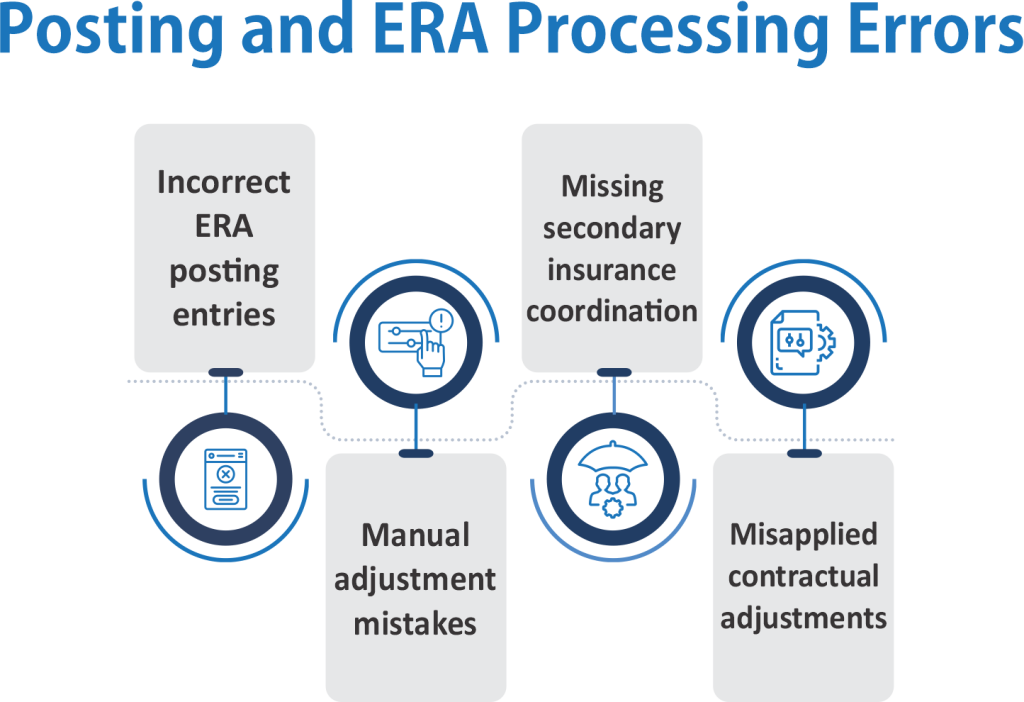
Posting and ERA Processing Errors
Posting and ERA processing errors occur during payment entry and electronic remittance handling. These errors directly impact the final reimbursement recorded in eClinicalWorks.
Common causes include:
Incorrect ERA posting entries: Payment amounts or adjustments are entered incorrectly during posting.
Manual adjustment mistakes: Staff overrides system values without proper validation.
Missing secondary insurance coordination: Secondary payer responsibility is not applied correctly.
Misapplied contractual adjustments: Incorrect contractual write-offs are recorded, which affects net payment accuracy.
How to Audit eClinicalWorks for Underpaid Insurance Claims (Step-by-Step Process)
This section explains the organized process for identifying underpaid insurance claims in eClinicalWorks. The process focuses on comparing expected reimbursement with actual payer payments. It helps billing teams detect payment gaps that are not visible through standard claim status checks. This is a core part of How to Audit eClinicalWorks for underpaid insurance claims in real billing workflows.
For users working in billing, coding, and revenue cycle roles, this process supports financial accuracy. Without a structured audit, underpayments remain hidden in paid claims. Organizations can strengthen this process by performing regular medical billing and coding audits to identify reimbursement variances before they impact revenue.
The steps below show how to review claims, validate payments, and identify variance issues using available eClinicalWorks reports and data fields.
Step 1: Extract Claim and ERA Data
Start by pulling claim-level and ERA (Electronic Remittance Advice) data from eClinicalWorks.
1. Generate claim detail reports for the given date range.
2. Export ERA files with payment and adjustment details
3. Include CPT/HCPCS codes and modifiers in the dataset
4. Match each claim with its corresponding ERA record
Step 2: Compare Allowed Amounts With Contract Rates
At this stage, compare payer payments against contracted fee schedules.
1. Match CPT/HCPCS codes with payer contract rates
2. Identify differences between the allowed amount and the paid amount
3. Check the modifier impact on reimbursement values
4. Validate secondary insurance contributions if applicable
Step 3: Identify Underpaid Claims
Filter claims where payment is lower than expected reimbursement.
1. Set variance threshold (example: payment below 95% of the allowed amount)
2. Group claims by payer and service type
3. Flag repeated underpayment patterns
4. Separate single-case vs recurring discrepancies
Step 4 – Validate Underpayment Findings
Before reporting, confirm whether the variance is valid.
1. Check payer policy updates for the service period
2. Review bundling or global payment rules
3. Validate modifier usage and documentation
4. Confirm coordination of benefits rules
Step 5: Document Audit Results
Record findings in a structured audit log for follow-up actions.
1. List claim numbers with variance details
2. Document expected vs actual payment amounts
3. Include payer-specific notes for appeals
4. Assign responsibility for correction or follow-up
eClinicalWorks Reimbursement Audit Process for Billing Teams
This section describes how billing teams set up a regular review of payer payments within eClinicalWorks. The key focus is on maintaining consistency in tracking payment accuracy across claims, payers, and service lines. This procedure complements How to Audit eClinicalWorks for Underpaid Insurance Claims by creating a repeatable review cycle rather than one-time checks.
Monthly Audit Workflow
A monthly audit workflow creates a consistent schedule for reviewing payer reimbursements. Regular reviews help billing teams identify payment discrepancies before they affect financial reporting.
The process begins by selecting a fixed reporting period and extracting claim payment and ERA data. This provides a reliable dataset for comparing expected reimbursement against actual payments.
Monthly reviews also help identify recurring underpayment trends by payer, CPT code, or specialty. Early detection allows teams to address issues before they result in significant revenue loss.
Tools and Reports Used in eClinicalWorks
eClinicalWorks offers several reporting tools that support reimbursement audits and payment validation. These reports provide visibility into claim performance and reimbursement activity.
Medical accounts receivable services include accounts receivable aging reports that help billing teams monitor outstanding balances, while claim detail reports and ERA reports track payment accuracy. Payment variance reports further assist in identifying differences between expected and received reimbursements.
When these reports are reviewed together, they provide a clearer picture of payer performance and claim-level payment trends. This supports informed decision-making and strengthens reimbursement oversight.
Conclusion
Underpaid insurance claims can create significant revenue loss even when claims are processed and paid. A structured eClinicalWorks underpayment audit helps billing teams identify reimbursement gaps, validate payer payments, and address discrepancies before they affect long-term financial performance.
By reviewing claim data, comparing payments against contract rates, and conducting regular reimbursement audits, healthcare organizations can improve payment accuracy and strengthen revenue cycle outcomes. Consistent monitoring also helps reduce revenue leakage, improve payer accountability, and support more reliable financial reporting. Practices that need additional support can benefit from professional medical billing services to improve reimbursement accuracy and optimize the revenue cycle.
FAQs
What is an underpaid insurance claim in eClinicalWorks?
An underpaid insurance claim occurs when a payer reimburses less than the contracted allowed amount for a service. The claim is processed and paid, but the reimbursement is lower than expected.
How often should billing teams perform an eClinicalWorks underpayment audit?
Most healthcare organizations benefit from conducting reimbursement audits monthly. Regular reviews help identify payment variances early and reduce long-term revenue leakage.
Which reports are useful for identifying underpaid claims in eClinicalWorks?
Claim detail reports, ERA reports, payment variance reports, and AR aging reports are commonly used. These reports help compare expected reimbursement against actual payer payments.
What are the most common causes of underpayments in eClinicalWorks?
Common causes include outdated fee schedules, payer contract mismatches, ERA posting errors, and incorrect contractual adjustments. These issues can result in payments below agreed reimbursement rates.
How can healthcare organizations recover underpaid insurance claims?
Recovery typically involves validating the underpayment, submitting corrected claims when necessary, and filing payer appeals with supporting documentation. Timely follow-up improves reimbursement recovery outcomes.