Managing patient records, appointments, follow-ups, billing, and communication through disconnected systems or manual processes can quickly become overwhelming for healthcare providers. As patient expectations continue to evolve, clinics, hospitals, and private practices need smarter solutions that streamline daily operations while delivering exceptional patient experiences.
That’s where the best patient management software comes in. From organizing patient data and automating appointment scheduling to improving care coordination and ensuring secure access to medical records, modern patient management solutions help healthcare organizations save time, reduce administrative burdens, and focus on what matters most: providing quality patient care.
Why Healthcare Providers Need Patient Management Software
Healthcare organizations face increasing pressure to deliver better patient care while managing growing administrative responsibilities. Manual processes, fragmented systems, and outdated record-keeping methods often result in inefficiencies that affect both staff productivity and patient satisfaction.
Patient management software addresses these challenges by automating routine tasks, improving communication, and providing healthcare professionals with immediate access to accurate patient information.
Common Challenges Without Patient Management Software
Healthcare providers relying on manual systems often experience:
- Long patient waiting times
- Missed or double-booked appointments
- Lost or incomplete patient records
- Billing inaccuracies and delayed payments
- Poor coordination between departments
- Difficulty tracking patient follow-ups
- Compliance and data security risks
- Increased administrative workload
These issues not only reduce operational efficiency but can also impact patient trust and clinical outcomes.
Benefits of Implementing Patient Management Software
By adopting a modern patient management solution, healthcare providers can:
- Centralize patient information in one secure location
- Automate appointment scheduling and reminders
- Reduce paperwork and manual data entry
- Improve communication between patients and healthcare teams
- Enhance patient engagement through digital portals
- Increase billing accuracy and streamline insurance processing
- Strengthen data security with role-based access controls and encrypted records
- Generate detailed reports for informed decision-making
- Improve compliance with healthcare regulations
- Deliver faster, more personalized patient care
Ultimately, patient management software enables healthcare organizations to operate more efficiently while providing a better experience for both patients and staff.
Best Patient Management Software: Top Solutions Compared
With numerous solutions available, selecting the right patient management software depends on your practice size, specialty, budget, and operational requirements. Some platforms are designed for enterprise hospitals, while others cater to independent practices or specialty clinics.
The following comparison highlights some of the most widely used patient management solutions available today.
| Software | Best For | Cloud-Based | Telemedicine | Billing | Mobile Access |
| Epic | Large hospitals and health systems | Yes | Yes | Yes | Yes |
| Athenahealth | Small to mid-sized practices | Yes | Yes | Yes | Yes |
| eClinicalWorks | Multi-specialty clinics | Yes | Yes | Yes | Yes |
| DrChrono | Private practices | Yes | Yes | Yes | Yes |
| AdvancedMD | Growing medical practices | Yes | Yes | Yes | Yes |
| Tebra (formerly Kareo) | Independent healthcare providers | Yes | Yes | Yes | Yes |
| NextGen Healthcare | Specialty practices | Yes | Yes | Yes | Yes |
| Practice Fusion | Small clinics | Yes | Limited | Yes | Yes |
| SimplePractice | Mental health and wellness providers | Yes | Yes | Yes | Yes |
| Cliniko | Allied health professionals | Yes | Limited | Yes | Yes |
What to Consider When Comparing Software
Rather than choosing software based solely on popularity, evaluate each solution based on factors such as:
- Ease of implementation and user experience
- Scalability as your practice grows
- Integration with EHR, laboratory, pharmacy, and billing systems
- Data security and regulatory compliance
- Customization options
- Customer support and onboarding services
- Reporting and analytics capabilities
- Mobile accessibility
- Automation features
- Total cost of ownership
The best patient management software is the one that aligns with your organization’s clinical workflows, budget, and long-term growth objectives. Investing in a solution that balances functionality, security, and ease of use can significantly improve operational efficiency while enhancing the quality of patient care.
Doctor Patient Management Software: How It Improves Clinical Workflows
Healthcare professionals juggle multiple responsibilities throughout the day—from managing appointments and documenting consultations to prescribing medications and coordinating follow-up care. Without the right digital tools, these tasks can become time-consuming, increase administrative burden, and reduce the time available for patient care. This is where doctor patient management software becomes invaluable.
Key Features of Doctor Patient Management Software
Smart Appointment Management
Doctors can view daily schedules, manage appointments, track patient queues, and reduce scheduling conflicts. Many platforms also support online booking and automated appointment reminders to minimize no-shows.
Electronic Medical Records (EMR)
During consultations, physicians can instantly access complete patient histories, including:
- Previous diagnoses
- Current medications
- Allergies
- Lab results
- Imaging reports
- Treatment history
- Vaccination records
Having complete information readily available leads to faster and more accurate clinical decisions.
Digital Prescriptions
Electronic prescribing reduces handwriting errors and enables prescriptions to be sent directly to pharmacies. Some systems also provide drug interaction alerts and dosage recommendations to improve medication safety.
Clinical Documentation
Doctors can efficiently record:
- Consultation notes
- Symptoms
- Diagnoses
- Treatment plans
- Progress notes
- SOAP notes
Many modern platforms also include AI-powered documentation tools that generate clinical notes during consultations, significantly reducing paperwork.
Laboratory and Imaging Integration
Integrated systems allow physicians to review laboratory results and diagnostic imaging within the patient’s profile, eliminating the need to switch between different applications.
Telemedicine Support
With virtual healthcare becoming increasingly common, doctor-patient management software often includes secure video consultations, remote patient monitoring, digital prescriptions, and online documentation.
Referral Management
Healthcare providers can easily create referrals, share patient records securely with specialists, and monitor referral progress, improving continuity of care.
Patient Communication
Secure messaging features allow doctors to answer patient questions, share reports, send treatment instructions, and communicate follow-up recommendations without compromising patient privacy.
Benefits for Healthcare Providers
Implementing doctor-patient management software helps physicians:
- Spend more time with patients instead of paperwork
- Reduce administrative workload
- Improve documentation accuracy
- Enhance collaboration with healthcare teams
- Make faster clinical decisions
- Increase patient satisfaction
- Improve treatment continuity
- Reduce medical errors
Patient Data Management Software Explained
Patient information is one of the most valuable assets in healthcare. From medical histories and diagnostic reports to prescriptions and insurance details, healthcare organizations generate and manage enormous volumes of sensitive information every day. Patient data management software ensures this information remains organized, secure, accurate, and readily accessible whenever it’s needed.
What Does Patient Data Management Software Do?
A comprehensive patient data management solution helps healthcare providers:
- Store patient records securely
- Organize medical histories
- Manage laboratory and imaging reports
- Track medications and allergies
- Record treatment plans
- Manage consent forms
- Maintain billing information
- Archive historical records
- Enable secure information sharing
Rather than maintaining separate databases across departments, all patient information is centralized into a single source of truth.
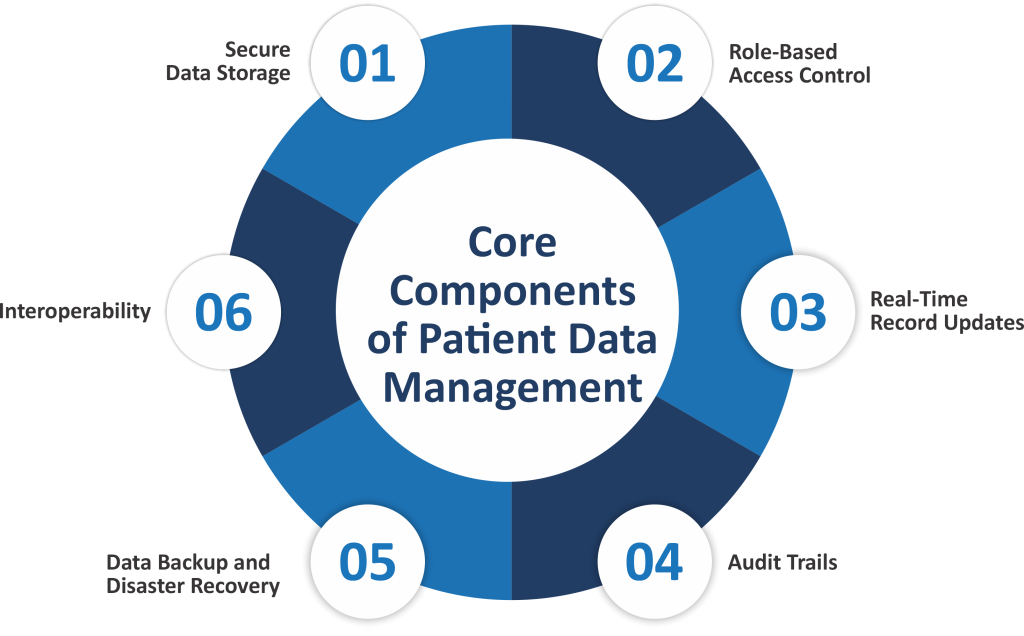
Core Components of Patient Data Management
Secure Data Storage
Patient records are stored in encrypted databases with multiple layers of protection against unauthorized access and cyber threats.
Role-Based Access Control
Not every staff member requires access to all patient information. Role-based permissions ensure employees only access the data necessary for their responsibilities.
Real-Time Record Updates
Healthcare professionals can update patient information during consultations, ensuring every department works with the latest and most accurate records.
Audit Trails
Every change made to patient records is automatically logged, creating complete transparency and supporting regulatory compliance.
Data Backup and Disaster Recovery
Automatic backups and disaster recovery capabilities help healthcare organizations recover patient information quickly in the event of hardware failures, cyberattacks, or natural disasters.
Interoperability
Modern patient data management software integrates seamlessly with:
- Electronic Health Records (EHR)
- Electronic Medical Records (EMR)
- Laboratory Information Systems
- Radiology systems
- Pharmacy software
- Billing platforms
- Telemedicine solutions
This interoperability eliminates duplicate data entry and improves collaboration across healthcare teams.
Patient Follow-Up Software: Improving Retention and Continuity of Care
Providing excellent healthcare doesn’t end when a patient leaves the clinic. Effective follow-up care plays a critical role in improving recovery, increasing patient satisfaction, reducing hospital readmissions, and strengthening long-term relationships. Patient follow-up software helps healthcare providers automate and manage these ongoing interactions efficiently.
Instead of relying on manual phone calls or paper reminders, patient follow-up software schedules and delivers timely communications through SMS, email, mobile notifications, or patient portals. This ensures patients stay engaged throughout their treatment journey. For practices aiming to maximize revenue capture alongside patient engagement, pairing these follow-up workflows with professional medical billing services helps ensure that all post-visit claims and recurring patient accounts are handled seamlessly.
Cloud-Based Patient Management System: Benefits and Challenges
Healthcare is becoming increasingly mobile, collaborative, and data-driven. As a result, many healthcare providers are replacing traditional on-premises software with a cloud-based patient management system that offers greater flexibility, scalability, and accessibility.
A cloud-based patient management system stores patient information on secure remote servers rather than local computers, allowing authorized users to access records from virtually anywhere with an internet connection.
Benefits of a Cloud-Based Patient Management System
Access Anytime, Anywhere:
Doctors and healthcare staff can securely access patient records from clinics, hospitals, satellite locations, or even during home visits, enabling better continuity of care.
Lower Upfront Costs:
Unlike traditional systems that require expensive servers and IT infrastructure, cloud-based solutions typically operate on subscription-based pricing, reducing initial investment.
Automatic Software Updates:
Cloud vendors regularly deliver updates, new features, bug fixes, and security improvements without requiring manual installations or system downtime.
Scalability:
As healthcare organizations grow, cloud platforms can easily accommodate additional users, departments, and locations without significant infrastructure upgrades.
Improved Collaboration:
Authorized healthcare professionals can work from the same centralized patient records, improving communication and reducing duplicate work across departments.
Enhanced Disaster Recovery:
Cloud providers maintain multiple backups across secure data centers, minimizing the risk of data loss due to hardware failures, cyberattacks, or natural disasters.
Strong Security Measures:
Leading cloud platforms invest heavily in cybersecurity technologies, including:
- Data encryption
- Multi-factor authentication
- Continuous monitoring
- Intrusion detection
- Automated backups
- Compliance certifications
Challenges to Consider
While cloud systems offer numerous advantages, organizations should also evaluate potential challenges.
Internet Dependency: Access to patient records depends on a stable internet connection.
Vendor Lock-In: Migrating to another platform may require careful planning and data migration support.
Data Migration Complexity: Moving historical patient records into a new system can be time-consuming without proper planning.
Regulatory Compliance: Providers should ensure vendors comply with applicable healthcare regulations and data protection requirements.
Cloud-Based vs. On-Premises Patient Management Systems
| Feature | Cloud-Based System | On-Premises System |
| Initial Cost | Lower | Higher |
| Maintenance | Vendor-managed | Organization-managed |
| Software Updates | Automatic | Manual |
| Accessibility | Anywhere with secure internet | Usually limited to local network |
| Scalability | Highly scalable | Limited by infrastructure |
| Disaster Recovery | Built-in backups | Organization responsible |
| IT Requirements | Minimal | Dedicated IT resources required |
For most modern healthcare organizations, cloud-based patient management systems offer greater flexibility, reduced maintenance costs, and easier scalability, making them a preferred choice for clinics, hospitals, and multi-location healthcare providers.
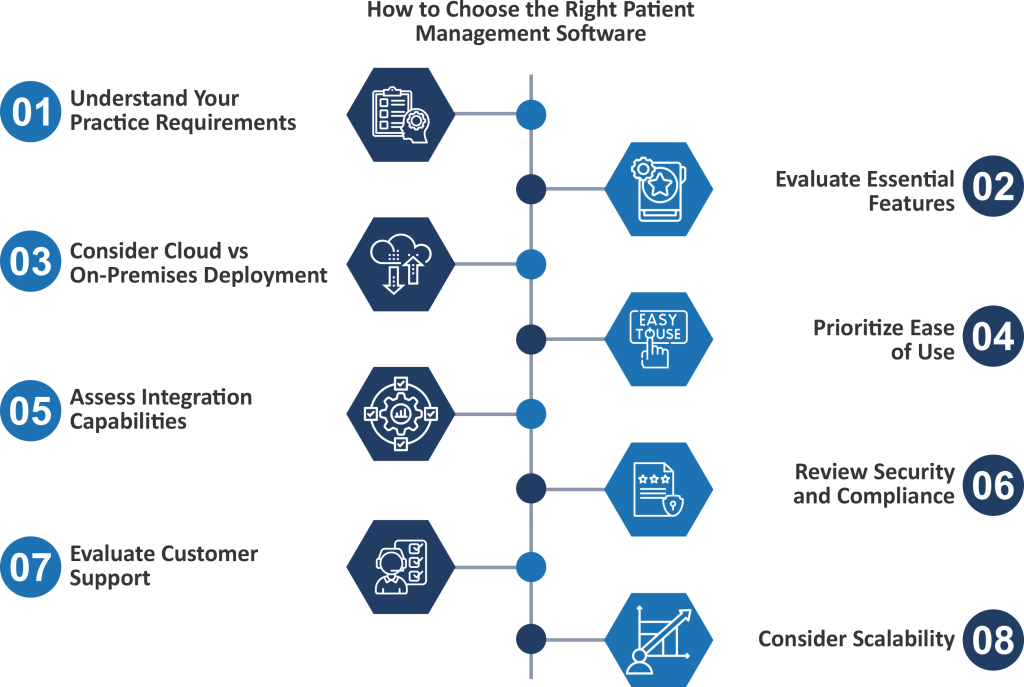
How to Choose the Right Patient Management Software
With hundreds of patient management solutions available, selecting the right platform can feel overwhelming. Every healthcare organization has unique workflows, budgets, compliance requirements, and long-term goals, making it essential to evaluate software carefully before making a decision.
1. Understand Your Practice Requirements
Start by identifying your organization’s specific needs.
Ask questions such as:
- How many healthcare providers will use the system?
- How many patients do you manage each month?
- Do you operate from multiple locations?
- Do you need specialty-specific workflows?
- Are telemedicine services required?
- Will patients need online appointment booking?
Clearly defining your requirements makes it easier to narrow down suitable options.
2. Evaluate Essential Features
The software should include the core tools your practice needs today while offering flexibility for future expansion.
Look for features such as:
- Patient registration
- Appointment scheduling
- Electronic medical records
- Billing and invoicing
- Insurance management
- E-prescriptions
- Patient portals
- Follow-up automation
- Reporting and analytics
- Mobile access
Avoid paying for features your organization is unlikely to use.
3. Consider Cloud vs. On-Premises Deployment
Many healthcare providers now prefer cloud-based patient management systems because they offer:
- Lower upfront costs
- Automatic updates
- Remote accessibility
- Better scalability
- Reduced IT maintenance
However, organizations with strict infrastructure requirements may still choose on-premises deployments.
4. Prioritize Ease of Use
Even the most feature-rich software will fail if staff members find it difficult to use.
Look for:
- Intuitive dashboards
- Simple navigation
- Minimal training requirements
- Fast workflows
- Responsive mobile applications
Request a live demonstration or free trial whenever possible.
5. Assess Integration Capabilities
Your patient management software should integrate seamlessly with existing healthcare technologies.
Important integrations include:
- Electronic Health Records (EHR)
- Electronic Medical Records (EMR)
- Laboratory systems
- Pharmacy software
- Billing platforms
- Payment gateways
- Telemedicine platforms
- Diagnostic imaging systems
Integrated systems reduce duplicate data entry and improve workflow efficiency.
6. Review Security and Compliance
Patient privacy should never be compromised.
Ensure the software provides:
- Data encryption
- Role-based permissions
- Multi-factor authentication
- Audit logs
- Automatic backups
- Secure cloud infrastructure
- Compliance with applicable healthcare regulations
Security should be evaluated alongside functionality, not as an afterthought.
7. Evaluate Customer Support
Reliable technical support can significantly reduce downtime during implementation and ongoing operations.
Look for vendors offering:
- 24/7 customer support
- Live chat
- Email assistance
- Phone support
- Knowledge bases
- Training materials
- Dedicated onboarding teams
Strong customer support often determines long-term software success.
8. Consider Scalability
Your software should continue supporting your organization as it grows.
Choose a solution capable of handling:
- Additional providers
- New specialties
- Multiple branches
- Increased patient volume
- Expanded reporting needs
Switching platforms later can be expensive and disruptive.
9. Compare Total Cost of Ownership
Pricing should include more than just the monthly subscription.
Evaluate:
- Implementation costs
- Data migration
- Training expenses
- Customization fees
- Support plans
- Integration costs
- Future upgrade expenses
Understanding the complete financial picture prevents unexpected costs later.
Additionally, to ensure all practitioners operating within your newly selected patient management software are properly credentialed and verified across insurance networks, clinics frequently partner with professional medical credentialing services.
Patient Management Software vs. EMR vs. EHR vs. Practice Management Software
Healthcare technology is filled with overlapping terms that can easily confuse decision-makers. While patient management software, Electronic Medical Records (EMR), Electronic Health Records (EHR), and Practice Management Software (PMS) are closely related, they serve different purposes. Understanding these differences is essential when choosing the right solution for your healthcare organization.
What is Patient Management Software?
Patient management software is designed to manage the entire patient lifecycle—from appointment scheduling and registration to billing, communication, follow-ups, and medical record access. It acts as a centralized platform that improves both administrative and clinical workflows.
What is an EMR?
An Electronic Medical Record (EMR) is the digital version of a patient’s paper chart within a single healthcare organization. It primarily focuses on clinical documentation, including diagnoses, medications, treatment history, laboratory results, and physician notes.
EMRs are typically used within one practice and are not always designed to share patient information across different healthcare providers.
What is an EHR?
An Electronic Health Record (EHR) expands on the capabilities of an EMR by allowing patient information to be securely shared across multiple healthcare organizations.
EHRs provide a comprehensive view of a patient’s health history, enabling better care coordination among hospitals, specialists, laboratories, pharmacies, and primary care providers.
What is Practice Management Software?
Practice management software focuses on the business operations of a healthcare practice. Its primary purpose is to improve administrative efficiency by managing scheduling, billing, insurance claims, payments, reporting, and financial workflows.
Unlike EMRs or EHRs, practice management software places less emphasis on clinical documentation.
| Feature | Patient Management Software | EMR | EHR | Practice Management Software |
| Appointment Scheduling | ✔ | Limited | Limited | ✔ |
| Patient Registration | ✔ | Limited | Limited | ✔ |
| Electronic Medical Records | ✔ | ✔ | ✔ | Limited |
| Billing & Invoicing | ✔ | Limited | Limited | ✔ |
| Insurance Management | ✔ | Limited | Limited | ✔ |
| Clinical Documentation | ✔ | ✔ | ✔ | ✖ |
| Patient Portal | ✔ | Some Systems | ✔ | Some Systems |
| Telemedicine | ✔ | Some Systems | Some Systems | Limited |
| Multi-Provider Collaboration | ✔ | Limited | ✔ | Limited |
| Reporting & Analytics | ✔ | ✔ | ✔ | ✔ |
| Follow-Up Management | ✔ | Limited | Limited | Limited |
Conclusion
The healthcare industry is rapidly embracing digital transformation, and patient management software has become an essential tool for delivering efficient, patient-centered care. By centralizing patient information, automating administrative tasks, streamlining clinical workflows, and improving communication, these solutions enable healthcare providers to focus on what matters most, achieving better patient outcomes.
Whether you’re searching for a patient management system for a growing clinic, patient data management software to secure medical records, doctor-patient management software to simplify clinical workflows, patient follow-up software to strengthen patient engagement, or a cloud-based patient management system that supports remote access and scalability, the right solution can transform the way your organization operates.